
Free tools
Here you'll find eight tools and a collection of small steps you can use without signing up and without talking to anyone first. Each tool answers a question that's open in many companies right now. They come in three groups: Understand your organization, Shape your rules and Answer for AI.
Your browser processes your answers and stores them only if you save them as a file yourself. The hacks show what you can change as early as next Monday.
In the AI Quick Scan, the Savings Calculator, the simulation, the Pattern Check, the worksheets and the Count for yourself section you can save your entries as a small file on your computer. Next time you load it again, for example to compare after a few months what has changed.
Where do I start?
Most people start with one of two questions: Where are things stuck in our organization? Where is AI already at work here? If you already know where things are stuck, you can go straight to Organizational Design.
All the other tools are further down in three groups: Understand your organization, Shape your rules and Answer for AI.
Understand your organization
Before you change anything, it helps to see clearly how your company decides today and where things get stuck. These tools show the pattern behind it and keep a record of what came of your decisions.
Twelve statements · about three minutes
Pattern Check
The Pattern Check consists of twelve short statements that you rate on a scale from one to five. It takes about three minutes. At the end you see which of five patterns is strongest in your organization right now and what AI changes about it. Only your browser processes your answers.
The Management Baseline shows whether the pattern applies to your whole leadership team, compared with a benchmark of 458 organizations. To the Management Baseline →
iPhone app · free
Clarity Loop
Clarity Loop is a free iPhone app. It records what you decide and reminds you on the date you set to look at what came of it. Decisions that start with a suggestion from an AI get their own template. The app is currently in the German App Store and works in English.
Shape your rules
Here you check whether your rules answer the questions that daily work and working with AI put to them, and where an explicit rule is missing.
Three worksheets · trigger check in five minutes
Worksheets on screen
The companion site to my book “Cheap to Make, Costly to Check” has three worksheets and a guided start that tells you where to begin. The trigger check settles in five minutes whether an AI use needs an explicit rule at all.
You can work on all four further with your own AI. A button copies the completed sheet together with matching instructions, so your AI can ask follow-up questions about your answers. The page itself sends nothing anywhere.
If a use needs a rule, we go through ten of your rules in the Rule Inventory and choose one of five options for each, all in ninety minutes. To the Rule Inventory →
23 pages · count for yourself in a few minutes
What AI Tests in Your Rules
On 23 pages, the white paper sets out ten questions that AI asks of a company's rules. Each question comes with a measure. In the Count for yourself section you take a few minutes to tick which of these questions you can already answer today with a name or a number. Your answers stay in your browser.
To the white paper → · Straight to Count for yourself →
What your count leaves open, you settle in an organizational constitution: hard limits, decision rights, rules for AI agents and the way to change the rules. To the organizational constitution →
Answer for AI
These tools show where AI is at work in your company, who's responsible for it, how much time it really saves once the results are checked and what it changes in your industry.
Software and ten questions · about 15 minutes
AI Quick Scan
You enter which programs in your company work with AI, who's responsible for each and whether it has been approved. Then you answer ten questions about your rules. At the end you see where rules are missing.
Bring the result to the Clarity Call. There we read it next to the evaluation of your survey. Clarity Call →
One task · about two minutes
Savings Calculator
Pick a task where you want to use AI or already do, such as writing quotes or pre-sorting job applications. The calculator shows how much of the expected savings is left after a thorough check, whether there's enough time for checking and who answers for the results that go through unchecked.
You can collect several tasks in a list and save it as a file or PDF. How checking time, basic rules and leadership fit together is explained in Why clear rules make AI faster.
Four questions · result as PDF if you like
AI Impact Simulation
In four questions the simulation shows how AI shifts work and decisions in a company in your industry. At the end you see where you stand, where to start and what goal makes sense for the next 12 to 18 months. Your browser creates the PDF of the result and sends nothing.
The Checking Load Assessment then measures, with data from your business systems, how much checking time has actually shifted in your company. To the Checking Load Assessment →
One A4 page · for printing
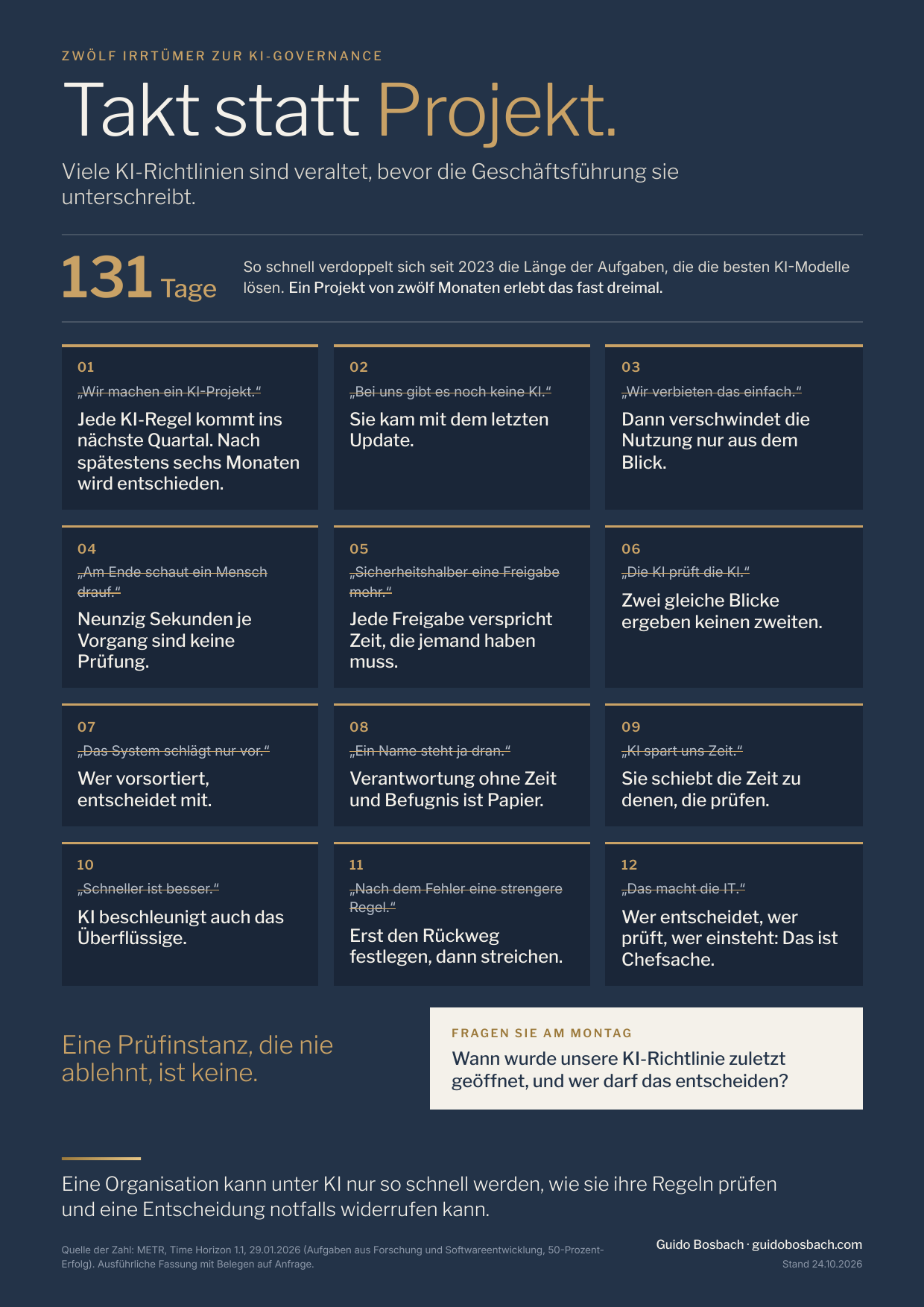
Twelve misconceptions about AI governance
The cheat sheet puts on one page the twelve assumptions I think are most common when companies introduce AI. Next to each one is what actually applies under AI. It adds four figures you can use to check whether your rules work. The sheet is meant for printing, for example for your next management meeting.
Cheat sheet (PDF in German, one A4 page) · Poster with the twelve misconceptions (PDF in German)
In the Quarterly Review you count again each quarter whether your rules still work. The report tells you when a figure climbs back over its threshold. To the Quarterly Review →
Free
Ten hacks for organization and AI
Small steps for executives and managers, one from each area. Each one comes with the effect you'll notice right away. All 100 hacks are on the companion site of the book series “Organization under AI”.
- 1
One name per tool
Every AI tool in the company has a person who answers for how it is used.
You'll notice: When someone asks “Who approved this?”, the answer comes within five seconds.
- 11
Savings net of checking time
Time saved with AI is reported only after the checking time has been deducted.
You'll notice: The slide with the big savings turns into a figure you can plan with.
- 25
Who may reopen it?
For every change you decide who may reopen it after launch.
You'll notice: Objections after go-live reach someone who can actually change something.
- 33
A calendar check
AI goes through the calendar and shows which recurring meetings produced no decision in four weeks.
You'll notice: Two recurring meetings disappear in the first week.
- 41
Keep what long-serving people know
Before someone leaves, an experienced colleague spends an hour describing where the errors tend to hide. AI turns it into a checklist.
You'll notice: Those who stay know what to watch for in AI results.
- 55
Cuts only after proof
Headcount is only adjusted once the new system has been shown to work.
You'll notice: Those who stay don't have to take on their former colleagues' work and the AI checking at the same time.
- 67
Exceptions with an end date
Every exception to a rule gets an end date.
You'll notice: Exceptions don't turn into quiet permanent rules.
- 74
Protect learning tasks for newcomers
Some of the tasks on which newcomers learn their craft are deliberately kept with people.
You'll notice: Five years from now there are still people who can judge AI results.
- 86
Share your own AI mistake
At a team meeting the manager talks about an AI error they missed themselves.
You'll notice: Others report their mistakes earlier.
- 94
Plan the way back
Before the old process is switched off, it's settled how you switch back to it in an emergency.
You'll notice: If the tool fails, operations keep going.
And then?
If one of the tools raises a question you'd like to talk through with someone, the Clarity Call is the next step. It's free. You answer a survey of about fifteen minutes, and within 48 hours you get a first assessment that we then read together.